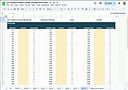
Download Your Free SAT Test Progress Tracker
This SAT test tracker helps you analyze practice test results and spot patterns so you can study more efficiently.
Before you get started, take one minute to review these quick tips so everything works smoothly:
How to use the tracker correctly:
-
The tracker opens as a view-only Google Sheet.
To use it, click File → Make a copy to save your own editable version. -
Do not download the sheet as an Excel file.
The tracker uses formulas that only work properly in Google Sheets. -
Watch the short walkthrough video below before entering data.
It shows you exactly where to input scores and how to avoid common mistakes.
Once you’ve made your copy, you can start entering results from your Bluebook practice tests right away.
Quick Start: Make a copy → Watch the video → Enter answers
This video has sound.
After clicking play, tap the 🎵 icon to enable audio.